In this article
ISNetworld® compliance usually means your company’s account meets the requirements assigned by a particular Hiring Client. CMS’s ISNetworld account support helps organize questionnaires, documents and ongoing updates for those requirements.
However, navigating the complex ISNetworld® platform can feel overwhelming.
This guide explains the main account requirements, how client-specific grades work, and what to check when your account needs attention.
What is ISN Compliance?
Contractors often use ISN compliance to mean that their account meets a particular Hiring Client’s qualification requirements. It is an account status, rather than a universal safety certification.
ISNetworld centralizes company information and documents so connected Hiring Clients can evaluate them. Each client can set requirements for its locations, work types, and risk categories, as described in ISN’s prequalification overview.
The Core Requirements for ISN Compliance
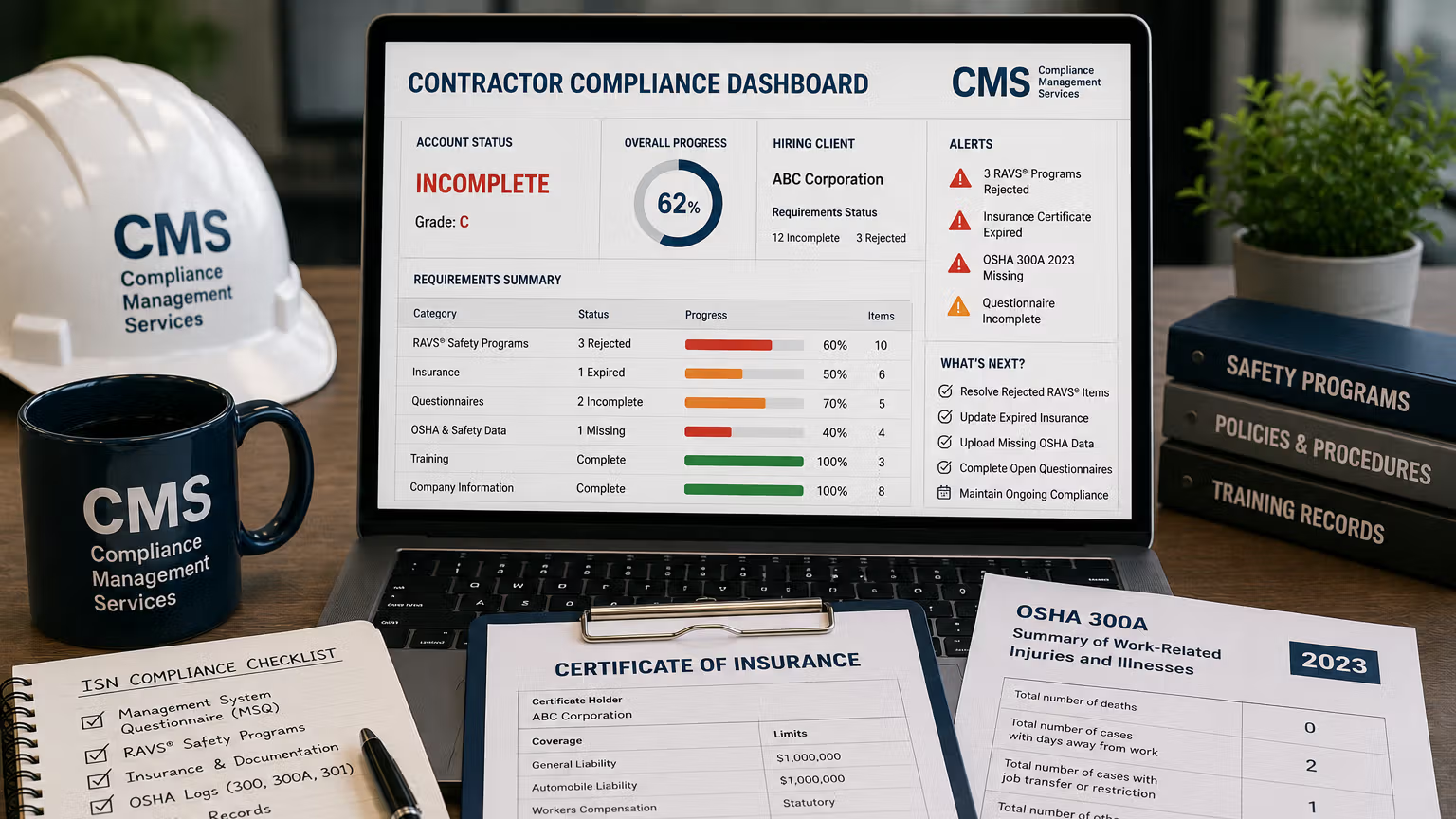
Your account may request information in several areas. The following are common parts of contractor qualification:
1. Management System Questionnaire (MSQ)
The Management System Questionnaire (MSQ) collects information about your company, work activities, and safety practices. Use current records when answering and check that your responses agree with your written programs.
2. Review and Verification Services (RAVS®)
ISN’s Review and Verification Services (RAVS®) reviews submitted documents against applicable criteria. If a program is rejected, read the reviewer’s comments and correct the specific gaps. ISN’s RAVS explanation distinguishes document review from verification that a company implements its programs in the field.
3. Insurance and Documentation
Review the insurance requirements shown for your client and coordinate any corrections with your insurance agent. Follow your account’s instructions for certificates and endorsements; a current policy alone may not satisfy every client’s requirements.
Depending on the client and the work, the account may also request:
- OSHA records or safety statistics for the years specified.
- EMR (Experience Modification Rate) letters from your insurance carrier.
- Employee training records.
Federal recordkeeping obligations vary by employer size and industry, and client requests may differ. Check OSHA’s recordkeeping guidance rather than assuming every contractor has the same log requirements.
4. Safety Performance Metrics
Hiring Clients may evaluate injury data, hours worked, TRIR (Total Recordable Incident Rate), and DART (Days Away, Restricted, or Transferred) rates. These figures are part of the qualification review; they should be entered accurately and supported by your records.
Understanding the ISN Grading System
ISN does not issue a universal “pass” or “fail” grade. Instead, the platform uses a dynamic grading scale—typically A, B, C, or F—that is completely customized by each hiring client.
- Client-Specific: You could have an “A” grade with Client X, but a “C” grade with Client Y because Client Y has stricter insurance requirements.
- Changing Requirements: Expired insurance, missing information, or newly assigned requirements can affect your status. Check the current client scorecard instead of relying on an earlier approval.
The Benefits of Becoming ISN Compliant
Keeping the account organized can help you respond when a customer requests qualification:
- Prepare for Customer Requirements: Complete the items your client needs before the planned work.
- Reduce Duplicate Administration: Maintain shared company information in one account while checking each client’s additional requirements.
- Keep Programs Useful: Written policies should reflect your actual work and support training and implementation, rather than simply filling an upload slot.
How to maintain your ISNetworld account
Account maintenance means keeping the information behind each client connection current. A document upload can be complete while its review is still pending. Check the client status and the individual request before marking the work finished.
ISN describes prequalification and ongoing monitoring as a process of collecting, reviewing and monitoring contractor information. The checklist below helps organize your side of that work. Use the requirements and dates displayed in your own account.
Check company details and client connections
Review your legal company name, contacts, work activities and operating locations when the business changes. Confirm that the client and location for the next job appear in the account. A new connection can bring different questions or documents, even when another client already accepts your company.
Review written programs against the work you do
Keep the current approved company version of each program in an organized folder. When work methods, equipment or responsibilities change, have the appropriate person review the program before updating the account. A reviewer accepting a document does not establish that the program has been put into practice.
Plan insurance renewals with your agent
Give your licensed insurance agent the current client’s requirements before renewal. Track the replacement certificate and any requested endorsements, then check the review result after submission. Correct dates, limits or wording with your agent; changing an uploaded file cannot change the underlying coverage.
Update requested safety data from source records
Keep the hours, incident information and other records behind your questionnaire answers. Check the reporting years and deadlines assigned in the account. Resolve inconsistencies before submitting; do not estimate missing figures or change accurate incident data to improve a grade.
Keep training records tied to the right people and tasks
Record the worker, training topic, completion date and provider or instructor, along with any renewal date that applies. Review the client’s requested evidence when workers or assignments change. An orientation card, a written program and a task-specific qualification serve different purposes. Our oil and gas training guide explains how to separate them.
Follow reviewer comments through to a result
Keep the rejection note with the document version and the correction requested. After resubmitting, record whether the item is pending, accepted or needs more work. If the comment is unclear, ask platform support or the reviewer for clarification. Repeatedly uploading an unchanged file leaves the original issue unresolved.
Assign an owner and a next check date
Use a simple task list with the client, open request, responsible person, due date and next action. Include items waiting on your insurance agent, a supervisor or a reviewer. Set a review schedule that fits your account activity, and check again when a new client, renewal notice or status change appears.
Review the account before the next job
Check the relevant client connection before planned mobilization, including any worker or site requirements handled outside the company account. Our work readiness and prequalification guide explains that distinction. If the client status has changed, use the account approval troubleshooting guide to work through the open items.
CMS’s dedicated account managers can help with questionnaires, document uploads and account updates. Tell us which account needs attention, and we can discuss the work you need help with.
Frequently Asked Questions (FAQ)
How much does ISN membership cost?
ISN describes an annual subscription and a one-time setup fee per country. Fees depend on your three-year average employee count and where you operate. Check ISN’s current fee guidance, or see our ISNetworld cost and budgeting guide for the other work to budget.
How long does it take to get ISN compliant?
Timing depends on the records you already have, the items assigned, corrections needed, and review queues. Start with our step-by-step ISNetworld account guide to identify the work still open.
Can I fix a failing ISN grade?
Review the reason for the grade, correct the missing or rejected items, and monitor their review status. Check the relevant client scorecard after updates rather than assuming a submission has resolved every requirement.
Editorial note
Disclaimer: ISNetworld® and RAVS® are registered trademarks of ISN Software Corporation. This guide is an independent educational resource and is not affiliated with or endorsed by ISN.